

Troubleshooting
We currently have no reported issues, please contact our support team if you experience any issues using the Attain STEM content.
Key points.
- Headsets need to cache the content on the initial download and then will operate offline if required.
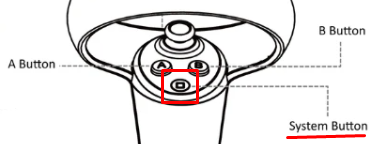
- If the App freezes or becomes inoperable, double click the ‘System’ button and choose ‘Exit’ to restart the scene.
A demo/basic lab loads but the full lab list is missing or greyed out — why?
This points to a licensing/activation problem rather than an app fault. The headset likely doesn't have a currently valid licence recognised by Proteus's activation database. Please contact ClassVR support at support@classvr.com
A student can't figure out how to pick up or use an instrument — what should the educator do?
Most standard objects are picked up with the grip (hand) trigger. Several instruments use a separate "Special Action" (index trigger) instead of or in addition to grip — including tweezers/tongs (open/close), the lighter (ignite), the wash bottle (squeeze), the syringe (push/pull, alternated with the X/A button), the pipette/dropper (dispense in 0.05 mL or 1 mL increments), and the burette (secure while filling). If a control isn't working as expected, check whether that specific instrument needs Special Action rather than Grip.
A student says the lab bench or tablet is awkwardly placed — can it be moved?
Yes. Clicking the right thumb stick makes a blue sphere appear in front of the main desk; grabbing it repositions the whole lab bench at the desired height and location. The virtual tablet can be moved independently by grabbing the stick at its base and placing it wherever is most comfortable.
A student feels motion sickness during a lab — what's causing it?
Proteus's own controls documentation flags that free navigation within a lab (using the left thumb stick to move and right thumb stick to rotate) "can induce motion sickness" and is "not recommended." Encourage students to use lab-bench repositioning (see above) rather than walking/rotating through the virtual space wherever possible.
Does Proteus Labs need an internet connection to run in class?
An internet connection is needed to download/update the app and to sync results or use multiplayer, but the labs themselves are usable in "single-person mode" offline once installed.
Does a student need to log in or have a personal account?
No, personal information is not required or collected.
Accessibility
Once the content has been downloaded to the headset it can be run offline independent of an internet connection.